 Boring Log Viewer
Turn boring log data into a clean, consistent boring log drawing including a graphic log, USCS symbols, material descriptions, samples, blow counts, laboratory results and groundwater.
You give it the data for one boring including metadata, stratigraphy, soil descriptions, sample and specimen information, and it draws the boring log for you. It uses standard soil symbols, a depth scale, a legend and a header. You can download the result as an SVG or PNG image, or print it to PDF.
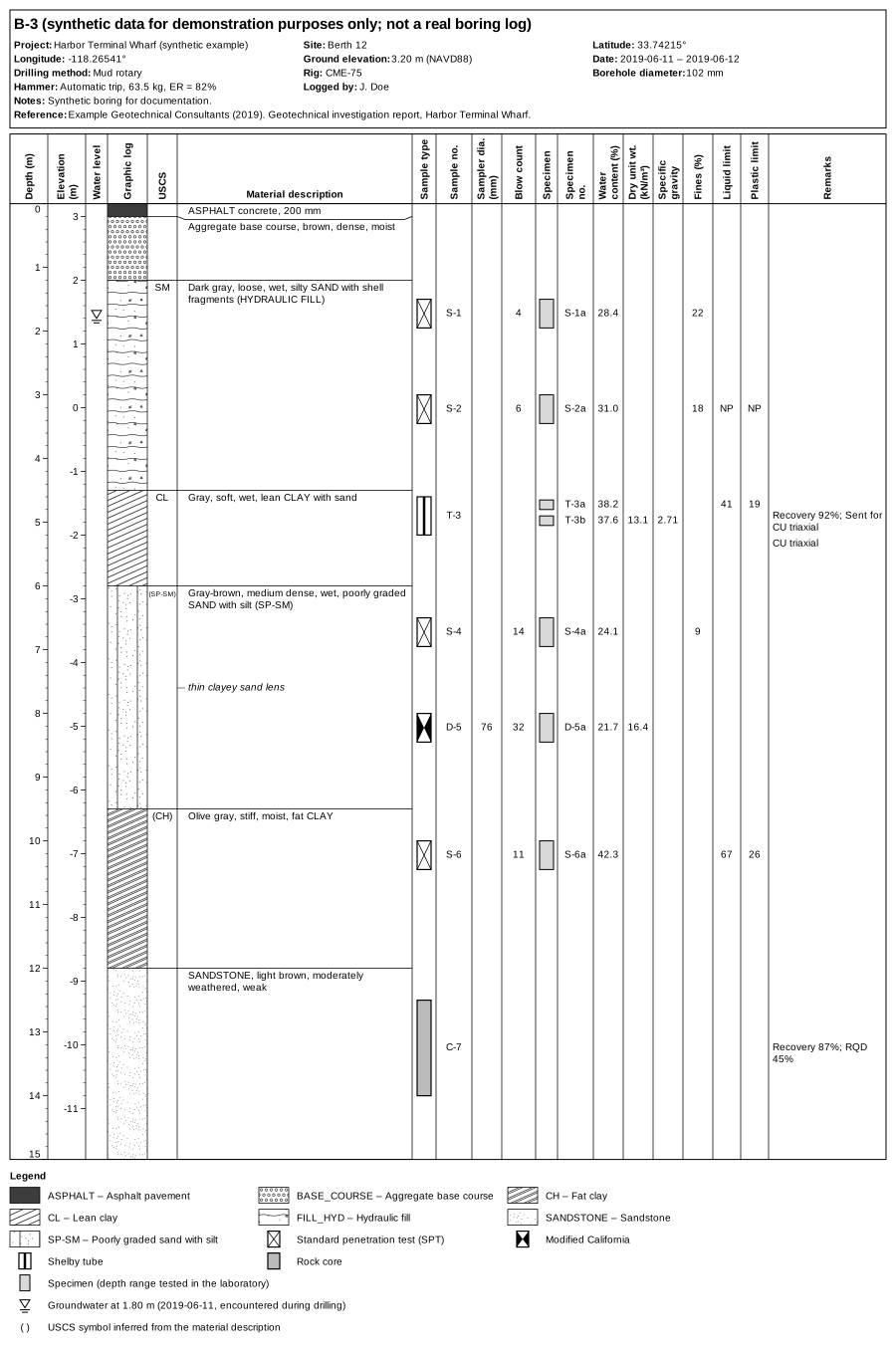
full-example.json. Click to open full size.Who it's for
The viewer was written for geotechnical engineers, engineering geologists, researchers and students who need to show boring logs. For example:
- drawing logs for a report or a paper from data you already have in a spreadsheet or database;
- looking at an AGS4 or DIGGS file someone sent you, without special software;
- showing boring logs on a website. The case-history databases at nextgenerationliquefaction.org and vspdb.org draw their boring logs with it.
You don't need to be a programmer. If you can fill in a spreadsheet, you can write the data the viewer needs; the first tutorial walks through it. Or fill in the Excel template and open it directly.
Three ways to use it
What it draws
- Header with the project, boring name, location, elevation, dates, drilling method, hammer and the references the data came from.
- Depth and elevation scales, in metres or feet.
- Groundwater levels: every reading is marked ▽ in the water level column, and its date and note are listed in the legend (not beside the symbol).
- Graphic log using the USCS soil symbols of the Caltrans Soil and Rock Logging, Classification, and Presentation Manual (2010), plus 67 symbols for fill, pavement, organic and other materials, and rock types after the FGDC geologic map standard. If you don't give a symbol, it is worked out from the material description when the description determines it. Descriptions that don't, such as a bare "SAND" or "GRAVEL", "clayey SILT", or a mixed layer, get no symbol and a blank graphic log until you add
uscsorhatch(see Graphic log). - Material descriptions beside their layers, with leader lines when a long description has to be moved down, and notes at a single depth (such as "thin sand lens") in italics.
- Samples: 22 sampler symbols (SPT, Modified California, Shelby tube, rock core, bulk and so on), sample numbers, blow counts, recovery.
- Laboratory specimens, each at its own depth within its sample, with water content, total and dry unit weight, specific gravity, fines content, liquid and plastic limits, and a lab USCS symbol.
- Your own columns, such as pocket penetrometer readings or undrained strength, with your own headings and widths.
- Legend listing only the symbols that appear in this log.
Columns with no data are left out, so a log with only layers is a narrow, simple drawing, and one with full laboratory data gets every column.
For a site with several borings, the web page keeps them in tabs and shows them on a map.
Where the data comes from
The viewer reads a boring log written in JSON, a plain-text format for structured data. JSON looks like this:
{
  "schema_version": "1.0",
  "units": { "length": "ft" },
  "layers": [
    { "top": 0, "bottom": 4,  "description": "Brown, loose, moist, silty SAND" },
    { "top": 4, "bottom": 12, "description": "Gray, soft, wet, lean CLAY" }
  ]
}
That's a complete boring log: two layers, with depths in feet. Everything else (samples, blow counts, lab data, groundwater) is optional and added the same way. The data format reference lists every field.
If your data isn't in JSON, three translators write the JSON for you:
| Format | Where | Details |
|---|---|---|
| Excel workbook laid out like the template, one sheet per part of the log | Web page | Excel workbooks |
| AGS4 (common in the UK and internationally) | Web page and API | Importing AGS4 and DIGGS |
| DIGGS XML (used by several US state DOTs) | Web page and API | Importing AGS4 and DIGGS |
Each one converts the file to the same JSON, which you can then check, edit and save.
Start with Your first boring log. It takes about ten minutes and builds a complete log in three steps.